From Express to Elysia
This guide is for Express users who want to see the differences from Express including syntax, and how to migrate your application from Express to Elysia by example.
Express is a popular web framework for Node.js, and widely used for building web applications and APIs. It is known for its simplicity and flexibility.
Elysia is an ergonomic web framework for Bun, Node.js, and runtimes that support Web Standard API. Designed to be ergonomic and developer-friendly with a focus on sound type safety and performance.
Performance
Elysia has significant performance improvements over Express thanks to native Bun implementation, and static code analysis.
Routing
Express and Elysia have similar routing syntax, using app.get() and app.post() methods to define routes and similar path parameter syntax.
::: code-group
import express from 'express'

const app = express()

app.get('/', (req, res) => {
    res.send('Hello World')
})

app.post('/id/:id', (req, res) => {
    res.status(201).send(req.params.id)
})

app.listen(3000)
:::
Express use
reqandresas request and response objects
::: code-group
import { Elysia } from 'elysia'

const app = new Elysia()
    .get('/', 'Hello World')
    .post(
    	'/id/:id',
     	({ status, params: { id } }) => {
      		return status(201, id)
      	}
    )
    .listen(3000)
:::
Elysia use a single
contextand returns the response directly
There is a slight different in style guide, Elysia recommends usage of method chaining and object destructuring.
Elysia also supports an inline value for the response if you don't need to use the context.
Handler
Both has a simliar property for accessing input parameters like headers, query, params, and body.
::: code-group
import express from 'express'

const app = express()

app.use(express.json())

app.post('/user', (req, res) => {
    const limit = req.query.limit
    const name = req.body.name
    const auth = req.headers.authorization

    res.json({ limit, name, auth })
})
:::
Express needs
express.json()middleware to parse JSON body
::: code-group
import { Elysia } from 'elysia'

const app = new Elysia()
	.post('/user', (ctx) => {
	    const limit = ctx.query.limit
	    const name = ctx.body.name
	    const auth = ctx.headers.authorization

	    return { limit, name, auth }
	})
:::
Elysia parse JSON, URL-encoded data, and formdata by default
Subrouter
Express use a dedicated express.Router() for declaring a sub router while Elysia treats every instances as a component that can be plug and play together.
::: code-group
import express from 'express'

const subRouter = express.Router()

subRouter.get('/user', (req, res) => {
	res.send('Hello User')
})

const app = express()

app.use('/api', subRouter)
:::
Express use
express.Router()to create a sub router
::: code-group
import { Elysia } from 'elysia'

const subRouter = new Elysia({ prefix: '/api' })
	.get('/user', 'Hello User')

const app = new Elysia()
	.use(subRouter)
:::
Elysia treat every instances as a component
Validation
Elysia has a built-in support for request validation using TypeBox sounds type safety, and support for Standard Schema out of the box allowing you to use your favorite library like Zod, Valibot, ArkType, Effect Schema and so on. While Express doesn't offers a built-in validation, and require a manual type declaration based on each validation library.
::: code-group
import express from 'express'
import { z } from 'zod'

const app = express()

app.use(express.json())

const paramSchema = z.object({
	id: z.coerce.number()
})

const bodySchema = z.object({
	name: z.string()
})

app.patch('/user/:id', (req, res) => {
	const params = paramSchema.safeParse(req.params)
	if (!params.success)
		return res.status(422).json(result.error)

	const body = bodySchema.safeParse(req.body)
	if (!body.success)
		return res.status(422).json(result.error)

	res.json({
		params: params.id.data,
		body: body.data
	})
})
:::
Express require external validation library like
zodorjoito validate request body
::: code-group
import { Elysia, t } from 'elysia'

const app = new Elysia()
	.patch('/user/:id', ({ params, body }) => ({
//                           ^?
		params,
		body
//   ^?
	}),


	{
		params: t.Object({
			id: t.Number()
		}),
		body: t.Object({
			name: t.String()
		})
	})
import { Elysia } from 'elysia'
import { z } from 'zod'
const app = new Elysia()
.patch('/user/:id', ({ params, body }) => ({
params,
body
}),
{
params: z.object({
id: z.number()
}),
body: z.object({
name: z.string()
})
})import { Elysia } from 'elysia'
import * as v from 'valibot'
const app = new Elysia()
.patch('/user/:id', ({ params, body }) => ({
params,
body
}),
{
params: v.object({
id: v.number()
}),
body: v.object({
name: v.string()
})
}):::
Elysia use TypeBox for validation, and coerce type automatically. While supporting various validation library like Zod, Valibot with the same syntax as well.
File upload
Express use an external library multer to handle file upload, while Elysia has a built-in support for file and formdata, mimetype valiation using declarative API.
::: code-group
import express from 'express'
import multer from 'multer'
import { fileTypeFromFile } from 'file-type'
import path from 'path'

const app = express()
const upload = multer({ dest: 'uploads/' })

app.post('/upload', upload.single('image'), async (req, res) => {
	const file = req.file

	if (!file)
		return res
			.status(422)
			.send('No file uploaded')

	const type = await fileTypeFromFile(file.path)
	if (!type || !type.mime.startsWith('image/'))
		return res
			.status(422)
			.send('File is not a valid image')

	const filePath = path.resolve(file.path)
	res.sendFile(filePath)
})
:::
Express needs
express.json()middleware to parse JSON body
::: code-group
import { Elysia, t } from 'elysia'

const app = new Elysia()
	.post('/upload', ({ body }) => body.file, {
		body: t.Object({
			file: t.File({
				type: 'image'
			})
		})
	})
:::
Elysia handle file, and mimetype validation declaratively
As multer doesn't validate mimetype, you need to validate the mimetype manually using file-type or similar library.
Elysia validate file upload, and use file-type to validate mimetype automatically.
Middleware
Express middleware use a single queue-based order while Elysia give you a more granular control using an event-based lifecycle.
Elysia's Life Cycle event can be illustrated as the following.
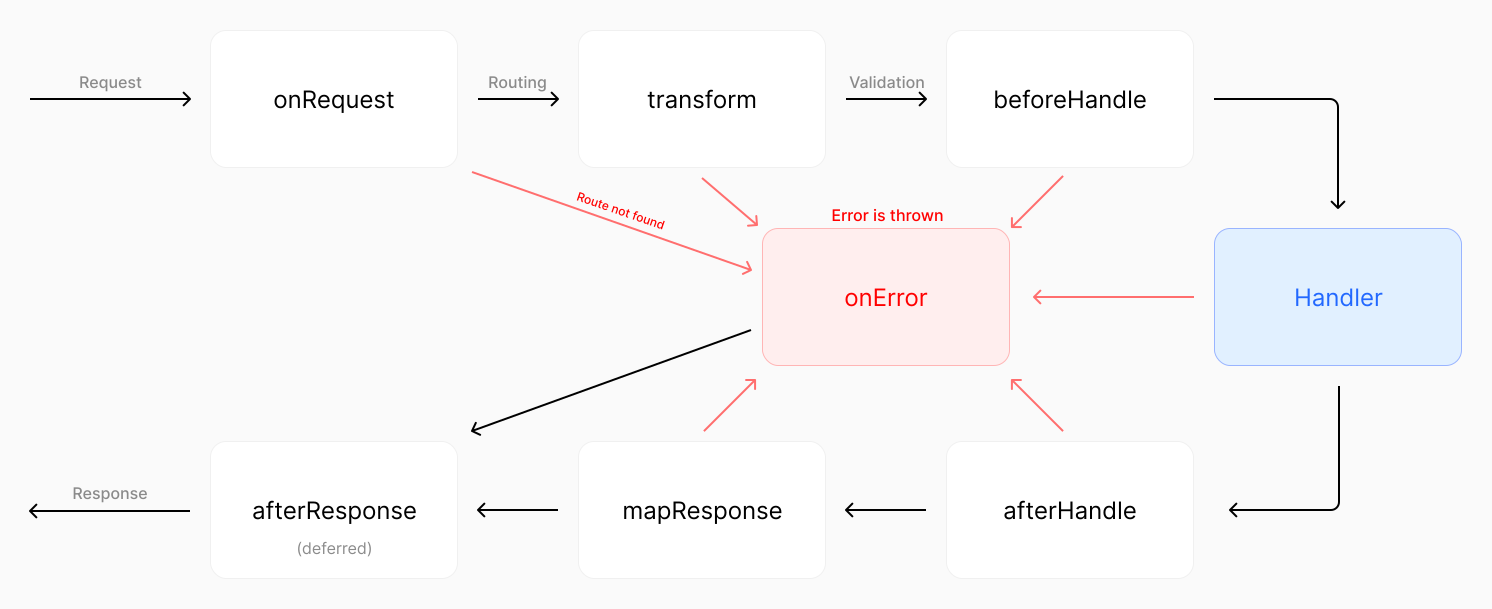
Click on image to enlarge
While Express has a single flow for request pipeline in order, Elysia can intercept each event in a request pipeline.
::: code-group
import express from 'express'

const app = express()

// Global middleware
app.use((req, res, next) => {
	console.log(`${req.method} ${req.url}`)
	next()
})

app.get(
	'/protected',
	// Route-specific middleware
	(req, res, next) => {
	  	const token = req.headers.authorization

	  	if (!token)
	   		return res.status(401).send('Unauthorized')

	  	next()
	},
	(req, res) => {
  		res.send('Protected route')
	}
)
:::
Express use a single queue-based order for middleware which execute in order
::: code-group
import { Elysia } from 'elysia'

const app = new Elysia()
	// Global middleware
	.onRequest(({ method, path }) => {
		console.log(`${method} ${path}`)
	})
	// Route-specific middleware
	.get('/protected', () => 'protected', {
		beforeHandle({ status, headers }) {
  			if (!headers.authorizaton)
     			return status(401)
		}
	})
:::
Elysia use a specific event interceptor for each point in the request pipeline
While Express has a next function to call the next middleware, Elysia does not has one.
Sounds type safety
Elysia is designed to be sounds type safety.
For example, you can customize context in a type safe manner using derive and resolve while Express doesn't.
::: code-group
// @errors: 2339
import express from 'express'
import type { Request, Response } from 'express'

const app = express()

const getVersion = (req: Request, res: Response, next: Function) => {
	// @ts-ignore
    req.version = 2

	next()
}

app.get('/version', getVersion, (req, res) => {
	res.send(req.version)
	//            ^?
})

const authenticate = (req: Request, res: Response, next: Function) => {
  	const token = req.headers.authorization

  	if (!token)
   		return res.status(401).send('Unauthorized')

	// @ts-ignore
    req.token = token.split(' ')[1]

	next()
}

app.get('/token', getVersion, authenticate, (req, res) => {
	req.version
	//  ^?

  	res.send(req.token)
   //            ^?
})
:::
Express use a single queue-based order for middleware which execute in order
::: code-group
import { Elysia } from 'elysia'

const app = new Elysia()
	.decorate('version', 2)
	.get('/version', ({ version }) => version)
	.resolve(({ status, headers: { authorization } }) => {
		if(!authorization?.startsWith('Bearer '))
			return status(401)

		return {
			token: authorization.split(' ')[1]
		}
	})
	.get('/token', ({ token, version }) => {
		version
		//  ^?


		return token
		//       ^?
	})
:::
Elysia use a specific event interceptor for each point in the request pipeline
While Express can, use declare module to extend the Request interface, it is globally available and doesn't have sounds type safety, and doesn't garantee that the property is available in all request handlers.
declare module 'express' {
  	interface Request {
    	version: number
  		token: string
  	}
}
This is required for the above Express example to work, which doesn't offers sounds type safety
Middleware parameter
Express use a function to return a plugin to define a reusable route-specific middleware, while Elysia use macro to define a custom hook.
::: code-group
const findUser = (authorization?: string) => {
	return {
		name: 'Jane Doe',
		role: 'admin' as const
	}
}
// ---cut---
// @errors: 2339
import express from 'express'
import type { Request, Response } from 'express'

const app = express()

const role = (role: 'user' | 'admin') =>
	(req: Request, res: Response, next: Function) => {
	  	const user = findUser(req.headers.authorization)

	  	if (user.role !== role)
	   		return res.status(401).send('Unauthorized')

		// @ts-ignore
	    req.user = user

		next()
	}

app.get('/token', role('admin'), (req, res) => {
  	res.send(req.user)
   //            ^?
})
:::
Express use a function callback to accept custom argument for middleware
::: code-group
const findUser = (authorization?: string) => {
	return {
		name: 'Jane Doe',
		role: 'admin' as const
	}
}
// ---cut---
import { Elysia } from 'elysia'

const app = new Elysia()
	.macro({
		role: (role: 'user' | 'admin') => ({
			resolve({ status, headers: { authorization } }) {
				const user = findUser(authorization)

				if(user.role !== role)
					return status(401)

				return {
					user
				}
			}
		})
	})
	.get('/token', ({ user }) => user, {
	//                 ^?
		role: 'admin'
	})
:::
Elysia use macro to pass custom argument to custom middleware
Error handling
Express use a single error handler for all routes, while Elysia provides a more granular control over error handling.
::: code-group
import express from 'express'

const app = express()

class CustomError extends Error {
	constructor(message: string) {
		super(message)
		this.name = 'CustomError'
	}
}

// global error handler
app.use((error, req, res, next) => {
	if(error instanceof CustomError) {
		res.status(500).json({
			message: 'Something went wrong!',
			error
		})
	}
})

// route-specific error handler
app.get('/error', (req, res) => {
	throw new CustomError('oh uh')
})
:::
Express use middleware to handle error, a single error handler for all routes
::: code-group
import { Elysia } from 'elysia'

class CustomError extends Error {
	// Optional: custom HTTP status code
	status = 500

	constructor(message: string) {
		super(message)
		this.name = 'CustomError'
	}

	// Optional: what should be sent to the client
	toResponse() {
		return {
			message: "If you're seeing this, our dev forgot to handle this error",
			error: this
		}
	}
}

const app = new Elysia()
	// Optional: register custom error class
	.error({
		CUSTOM: CustomError,
	})
	// Global error handler
	.onError(({ error, code }) => {
		if(code === 'CUSTOM')
		// ^?


			return {
				message: 'Something went wrong!',
				error
			}
	})
	.get('/error', () => {
		throw new CustomError('oh uh')
	}, {
		// Optional: route specific error handler
		error({ error }) {
			return {
				message: 'Only for this route!',
				error
			}
		}
	})
:::
Elysia provide more granular control over error handling, and scoping mechanism
While Express offers error handling using middleware, Elysia provide:
- Both global and route specific error handler
- Shorthand for mapping HTTP status and
toResponsefor mapping error to a response - Provide a custom error code for each error
The error code is useful for logging and debugging, and is important when differentiating between different error types extending the same class.
Elysia provides all of this with type safety while Express doesn't.
Encapsulation
Express middleware is registered globally, while Elysia give you a control over side-effect of a plugin via explicit scoping mechanism, and order-of-code.
::: code-group
import express from 'express'

const app = express()

app.get('/', (req, res) => {
	res.send('Hello World')
})

const subRouter = express.Router()

subRouter.use((req, res, next) => {
	const token = req.headers.authorization

	if (!token)
		return res.status(401).send('Unauthorized')

	next()
})

app.use(subRouter)

// has side-effect from subRouter
app.get('/side-effect', (req, res) => {
	res.send('hi')
})
:::
Express doesn't handle side-effect of middleware, and requires a prefix to separate the side-effect
::: code-group
import { Elysia } from 'elysia'

const subRouter = new Elysia()
	.onBeforeHandle(({ status, headers: { authorization } }) => {
		if(!authorization?.startsWith('Bearer '))
			return status(401)
   	})

const app = new Elysia()
    .get('/', 'Hello World')
    .use(subRouter)
    // doesn't have side-effect from subRouter
    .get('/side-effect', () => 'hi')
:::
Elysia encapsulate a side-effect into a plugin
By default, Elysia will encapsulate lifecycle events and context to the instance that is used, so that the side-effect of a plugin will not affect parent instance unless explicitly stated.
import { Elysia } from 'elysia'

const subRouter = new Elysia()
	.onBeforeHandle(({ status, headers: { authorization } }) => {
		if(!authorization?.startsWith('Bearer '))
			return status(401)
   	})
	// Scoped to parent instance but not beyond
	.as('scoped') // [!code ++]

const app = new Elysia()
    .get('/', 'Hello World')
    .use(subRouter)
    // [!code ++]
    // now have side-effect from subRouter
    .get('/side-effect', () => 'hi')
Elysia offers 3 type of scoping mechanism:
- local - Apply to current instance only, no side-effect (default)
- scoped - Scoped side-effect to the parent instance but not beyond
- global - Affects every instances
While Express can scope the middleware side-effect by adding a prefix, it isn't a true encapsulation. The side-effect is still there but separated to any routes starts with said prefix, adding a mental overhead to the developer to memorize which prefix has side-effect.
Which you can do the following:
- Move order of code from but only if there are a single instance with side-effects.
- Add a prefix, but the side-effects are still there. If other instance has the same prefix, then it has the side-effects.
This can leads to a nightmarish scenario to debug as Express doesn't offers true encapsulation.
Cookie
Express use an external library cookie-parser to parse cookies, while Elysia has a built-in support for cookie and use a signal-based approach to handle cookies.
::: code-group
import express from 'express'
import cookieParser from 'cookie-parser'

const app = express()

app.use(cookieParser('secret'))

app.get('/', function (req, res) {
	req.cookies.name
	req.signedCookies.name

	res.cookie('name', 'value', {
		signed: true,
		maxAge: 1000 * 60 * 60 * 24
	})
})
:::
Express use
cookie-parserto parse cookies
::: code-group
import { Elysia } from 'elysia'

const app = new Elysia({
	cookie: {
		secret: 'secret'
	}
})
	.get('/', ({ cookie: { name } }) => {
		// signature verification is handle automatically
		name.value

		// cookie signature is signed automatically
		name.value = 'value'
		name.maxAge = 1000 * 60 * 60 * 24
	})
:::
Elysia use signal-based approach to handle cookies
OpenAPI
Express require a separate configuration for OpenAPI, validation, and type safety while Elysia has a built-in support for OpenAPI using schema as a single source of truth.
::: code-group
import express from 'express'

import swaggerUi from 'swagger-ui-express'

const app = express()
app.use(express.json())

app.post('/users', (req, res) => {
	// TODO: validate request body
	res.status(201).json(req.body)
})

const swaggerSpec = {
	openapi: '3.0.0',
	info: {
		title: 'My API',
		version: '1.0.0'
	},
	paths: {
		'/users': {
			post: {
				summary: 'Create user',
				requestBody: {
					content: {
						'application/json': {
							schema: {
								type: 'object',
								properties: {
									name: {
										type: 'string',
										description: 'First name only'
									},
									age: { type: 'integer' }
								},
								required: ['name', 'age']
							}
						}
					}
				},
				responses: {
					'201': {
						description: 'User created'
					}
				}
			}
		}
	}
}

app.use('/docs', swaggerUi.serve, swaggerUi.setup(swaggerSpec))
:::
Express requires a separate configuration for OpenAPI, validation, and type safety
::: code-group
import { Elysia, t } from 'elysia'
import { openapi } from '@elysiajs/openapi' // [!code ++]

const app = new Elysia()
	.use(openapi()) // [!code ++]
	.model({
		user: t.Array(
			t.Object({
				name: t.String(),
				age: t.Number()
			})
		)
	})
	.post('/users', ({ body }) => body, {
	//                  ^?
		body: 'user',
		response: {
			201: 'user'
		},
		detail: {
			summary: 'Create user'
		}
	})
:::
Elysia use a schema as a single source of truth
Elysia will generate OpenAPI specification based on the schema you provided, and validate the request and response based on the schema, and infer type automatically.
Elysia also appends the schema registered in model to the OpenAPI spec, allowing you to reference the model in a dedicated section in Swagger or Scalar UI.
Testing
Express use a single supertest library to test the application, while Elysia is built on top of Web Standard API allowing it be used with any testing library.
::: code-group
import express from 'express'
import request from 'supertest'
import { describe, it, expect } from 'vitest'

const app = express()

app.get('/', (req, res) => {
	res.send('Hello World')
})

describe('GET /', () => {
	it('should return Hello World', async () => {
		const res = await request(app).get('/')

		expect(res.status).toBe(200)
		expect(res.text).toBe('Hello World')
	})
})
:::
Express use
supertestlibrary to test the application
::: code-group
import { Elysia } from 'elysia'
import { describe, it, expect } from 'vitest'

const app = new Elysia()
	.get('/', 'Hello World')

describe('GET /', () => {
	it('should return Hello World', async () => {
		const res = await app.handle(
			new Request('http://localhost')
		)

		expect(res.status).toBe(200)
		expect(await res.text()).toBe('Hello World')
	})
})
:::
Elysia use Web Standard API to handle request and response
Alternatively, Elysia also offers a helper library called Eden for End-to-end type safety, allowing us to test with auto-completion, and full type safety.
import { Elysia } from 'elysia'
import { treaty } from '@elysiajs/eden'
import { describe, expect, it } from 'bun:test'

const app = new Elysia().get('/hello', 'Hello World')
const api = treaty(app)

describe('GET /', () => {
	it('should return Hello World', async () => {
		const { data, error, status } = await api.hello.get()

		expect(status).toBe(200)
		expect(data).toBe('Hello World')
		//      ^?
	})
})
End-to-end type safety
Elysia offers a built-in support for end-to-end type safety without code generation using Eden, Express doesn't offers one.
::: code-group
import { Elysia, t } from 'elysia'
import { treaty } from '@elysiajs/eden'

const app = new Elysia()
	.post('/mirror', ({ body }) => body, {
		body: t.Object({
			message: t.String()
		})
	})

const api = treaty(app)

const { data, error } = await api.mirror.post({
	message: 'Hello World'
})

if(error)
	throw error
	//     ^?


console.log(data)
//          ^?


// ---cut-after---
console.log('ok')
:::
If end-to-end type safety is important for you then Elysia is the right choice.
Elysia offers a more ergonomic and developer-friendly experience with a focus on performance, type safety, and simplicity while Express is a popular web framework for Node.js, but it has some limitations when it comes to performance and simplicity.
If you are looking for a framework that is easy to use, has a great developer experience, and is built on top of Web Standard API, Elysia is the right choice for you.
Alternatively, if you are coming from a different framework, you can check out: