Lifecycle
Lifecycle events allow you to intercept important events at predefined points, allowing you to customize the behavior of your server as needed.
Elysia’s lifecycle can be illustrated as the following.
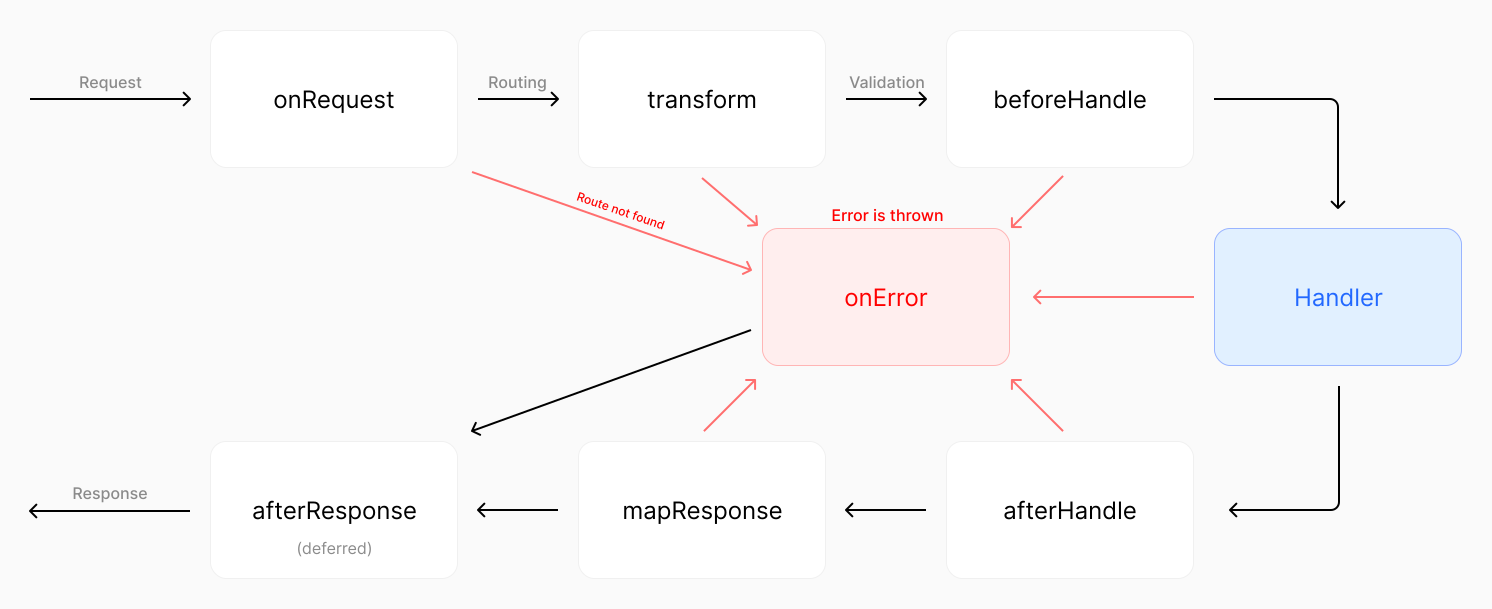
Click on image to enlarge
Below are the request lifecycle events available in Elysia:
| Event | Description |
|---|---|
| Request | Notify new event is received |
| Parse | Parse body into Context.body |
| Transform | Modify Context before validation |
| Before Handle | Custom validation before route handler |
| After Handle | Transform returned value into a new value |
| Map Response | Map returned value into a response |
| On Error (Error Handling) | Handle errors thrown in the life‑cycle |
| After Response | Executed after response sent to the client |
| Trace | Audit and capture timespan of each event |
Why
Let’s say we want to send back some HTML.
Normally, we’d set the "Content-Type" header to "text/html" so the browser can render it.
But manually setting one for each route is tedious.
Instead, what if the framework could detect when a response is HTML and automatically set the header for you? That’s where the idea of a lifecycle comes in.
Hook
Each function that intercepts the lifecycle event is called a hook (as the function hooks into the lifecycle event).
Hooks can be categorized into 2 types:
- Local Hook: Execute on a specific route
- Interceptor Hook: Execute on every route after the hook is registered
TIP
The hook will accept the same Context as a handler; you can imagine adding a route handler but at a specific point.
Local Hook
A local hook is executed on a specific route.
To use a local hook, you can inline hook into a route handler:
import { Elysia } from 'elysia'
import { isHtml } from '@elysiajs/html'

new Elysia()
  .get('/', () => '<h1>Hello World</h1>', {
    afterHandle({ responseValue, set }) {
      if (isHtml(responseValue))
        set.headers['Content-Type'] = 'text/html; charset=utf8'
    }
  })
  .get('/hi', () => '<h1>Hello World</h1>')
  .listen(3000)
The response should be listed as follows:
| Path | Content-Type |
|---|---|
/ | text/html; charset=utf8 |
/hi | text/plain; charset=utf8 |
Interceptor Hook
Register hook into every handler of the current instance that came after.
To add an interceptor hook, you can use .on followed by a lifecycle event in camelCase:
import { Elysia } from 'elysia'
import { isHtml } from '@elysiajs/html'

new Elysia()
  .get('/none', () => '<h1>Hello World</h1>')
  .onAfterHandle(({ responseValue, set }) => {
    if (isHtml(responseValue))
      set.headers['Content-Type'] = 'text/html; charset=utf8'
  })
  .get('/', () => '<h1>Hello World</h1>')
  .get('/hi', () => '<h1>Hello World</h1>')
  .listen(3000)
The response should be listed as follows:
| Path | Content-Type |
|---|---|
/none | text/plain; charset=utf8 |
/ | text/html; charset=utf8 |
/hi | text/html; charset=utf8 |
Events from other plugins are also applied to the route, so the order of code is important.
Order of code
Event will only apply to routes after it is registered.
If you put the onError before plugin, plugin will not inherit the onError event.
import { Elysia } from 'elysia'

new Elysia()
  .onBeforeHandle(() => {
    console.log('1')
  })
  .get('/', () => 'hi')
  .onBeforeHandle(() => {
    console.log('2')
  })
  .listen(3000)
Console should log the following:
1Notice that it doesn’t log 2, because the event is registered after the route so it is not applied to the route.
This also applies to the plugin.
import { Elysia } from 'elysia'

new Elysia()
  .onBeforeHandle(() => {
    console.log('1')
  })
  .use(someRouter)
  .onBeforeHandle(() => {
    console.log('2')
  })
  .listen(3000)
In this example, only 1 will be logged because the event is registered after the plugin.
Every events will follows the same rule except onRequest.
Because onRequest happens on request, it doesn’t know which route to apply to so it’s a global event.
Request
The first lifecycle event to get executed for every new request is received.
As onRequest is designed to provide only the most crucial context to reduce overhead, it is recommended to use in the following scenarios:
- Caching
- Rate Limiter / IP/Region Lock
- Analytic
- Provide custom header, e.g. CORS
Example
Below is a pseudocode to enforce rate‑limits on a certain IP address.
import { Elysia } from 'elysia'

new Elysia()
  .use(rateLimiter)
  .onRequest(({ rateLimiter, ip, set, status }) => {
    if (rateLimiter.check(ip)) return status(420, 'Enhance your calm')
  })
  .get('/', () => 'hi')
  .listen(3000)
If a value is returned from onRequest, it will be used as the response and the rest of the lifecycle will be skipped.
Pre Context
Context's onRequest is typed as PreContext, a minimal representation of Context with the attribute on the following:
request: Requestset: Setstoredecorators
Context doesn’t provide derived value because derive is based on onTransform event.
Parse
Parse is an equivalent of body parser in Express.
A function to parse body, the return value will be appended to Context.body. If not, Elysia will continue iterating through additional parser functions assigned by onParse until either body is assigned or all parsers have been executed.
(Continues…)