Accelerate your next Prisma server with Elysia
Author: saltyaom
Published: 4 Jun 2023
Twitter @saltyaom

Prisma is a renowned TypeScript ORM for its developer experience.
With type‑safe and intuitive API that allows us to interact with databases using a fluent and natural syntax.
Writing a database query is as simple as writing a shape of data with TypeScript auto‑completion, then Prisma takes care of the rest by generating efficient SQL queries and handling database connections in the background.
Key Features
Prisma works with popular databases like:
- PostgreSQL
- MySQL
- SQLite
- SQL Server
- MongoDB
- CockroachDB
So you can focus on what really matters: building your application logic.
Prisma’s declarative API and fluent developer experience inspire Elysia, another fast, type‑safe framework built for Bun.
Elysia
Elysia is an excellent choice when you need a framework for Bun.
- Elysia outperforms Express by roughly 19× faster performance.
- It has a fluent developer experience and is designed to be used with Prisma from the very start.
- With Elysia’s strict type‑validation, you can integrate Prisma easily, keeping runtime type and TypeScript type in sync.
Setting up
Run the following to scaffold an Elysia server:
bun create elysia elysia-prisma(Replace elysia-prisma with your desired project name.)
Install Prisma CLI
bun add -d prismaInitialize Prisma
bunx prisma initprisma init creates a .env file and a prisma folder with schema.prisma.
Edit schema.prisma
generator client {
  provider = "prisma-client-js"
}

datasource db {
  provider = "postgresql"
  url      = env("DATABASE_URL")
}

model User {
  id       Int    @id @default(autoincrement())
  username String @unique
  password String
}
This schema defines a User table with:
| Column | Type | Constraint |
|---|---|---|
| id | Number | Primary key, auto increment |
| username | String | Unique |
| password | String | – |
Before syncing, set DATABASE_URL in .env (example with Docker):
docker run -p 5432:5432 -e POSTGRES_PASSWORD=12345678 -d postgresDATABASE_URL="postgresql://postgres:12345678@localhost:5432/db?schema=public"
Run Migrations
bunx prisma migrate dev --name initPrisma generates a strongly‑typed client based on your schema.
Into the code
Create a simple user sign‑up endpoint in src/index.ts.
import { Elysia } from 'elysia'
import { PrismaClient } from '@prisma/client'

const db = new PrismaClient()

const app = new Elysia()
  .post(
    '/sign-up',
    async ({ body }) => db.user.create({ data: body })
  )
  .listen(3000)

console.log(`🦊 Elysia is running at ${app.server?.hostname}:${app.server?.port}`)
TIP
It’s important that when returning a Prisma function you mark the callback asasync.
Prisma functions don’t return nativePromise, so Elysia cannot automatically await them unless the function is async.
Adding validation
import { Elysia, t } from 'elysia'
import { PrismaClient } from '@prisma/client'

const db = new PrismaClient()

const app = new Elysia()
  .post(
    '/sign-up',
    async ({ body }) => db.user.create({ data: body }),
    {
      body: t.Object({
        username: t.String(),
        password: t.String({ minLength: 8 })
      })
    }
  )
  .listen(3000)

console.log(`🦊 Elysia is running at ${app.server?.hostname}:${app.server?.port}`)
Now body is typed as:
{
  username: string
  password: string
}
Error Handling
Prisma throws errors such as P2002 for unique constraint violations.
Define a custom error handler with Elysia’s onError hook:
import { Elysia, t } from 'elysia'
import { PrismaClient } from '@prisma/client'

const db = new PrismaClient()

const app = new Elysia()
  .post(
    '/',
    async ({ body }) => db.user.create({ data: body }),
    {
      error({ code }) {
        switch (code) {
          // Prisma P2002: "Unique constraint failed on the {constraint}"
          case 'P2002':
            return { error: 'Username must be unique' }
        }
      },
      body: t.Object({
        username: t.String(),
        password: t.String({ minLength: 8 })
      })
    }
  )
  .listen(3000)

console.log(`🦊 Elysia is running at ${app.server?.hostname}:${app.server?.port}`)
The custom error returns a JSON response:
{
  error: 'Username must be unique'
}
Bonus: Reference Schema
To avoid boilerplate, use a reference schema:
import { Elysia, t } from 'elysia'
import { PrismaClient } from '@prisma/client'

const db = new PrismaClient()

const app = new Elysia()
  .model({
    'user.sign': t.Object({
      username: t.String(),
      password: t.String({ minLength: 8 })
    })
  })
  .post(
    '/',
    async ({ body }) => db.user.create({ data: body }),
    {
      error({ code }) {
        switch (code) {
          case 'P2002':
            return { error: 'Username must be unique' }
        }
      },
      body: 'user.sign'
    }
  )
  .listen(3000)

console.log(`🦊 Elysia is running at ${app.server?.hostname}:${app.server?.port}`)
Bonus: Documentation
Elysia’s type system is OpenAPI Schema 3.0 compliant.
Use the Swagger plugin to auto‑generate documentation:
bun add @elysiajs/swaggerimport { Elysia, t } from 'elysia'
import { PrismaClient } from '@prisma/client'
import { swagger } from '@elysiajs/swagger'
const db = new PrismaClient()
const app = new Elysia()
.use(swagger())
.post(
'/',
async ({ body }) => db.user.create({
data: body,
select: { id: true, username: true }
}),
{
error({ code }) {
switch (code) {
case 'P2002':
return { error: 'Username must be unique' }
}
},
body: t.Object({
username: t.String(),
password: t.String({ minLength: 8 })
}),
response: t.Object({
id: t.Number(),
username: t.String()
})
}
)
.listen(3000)
console.log(`🦊 Elysia is running at ${app.server?.hostname}:${app.server?.port}`)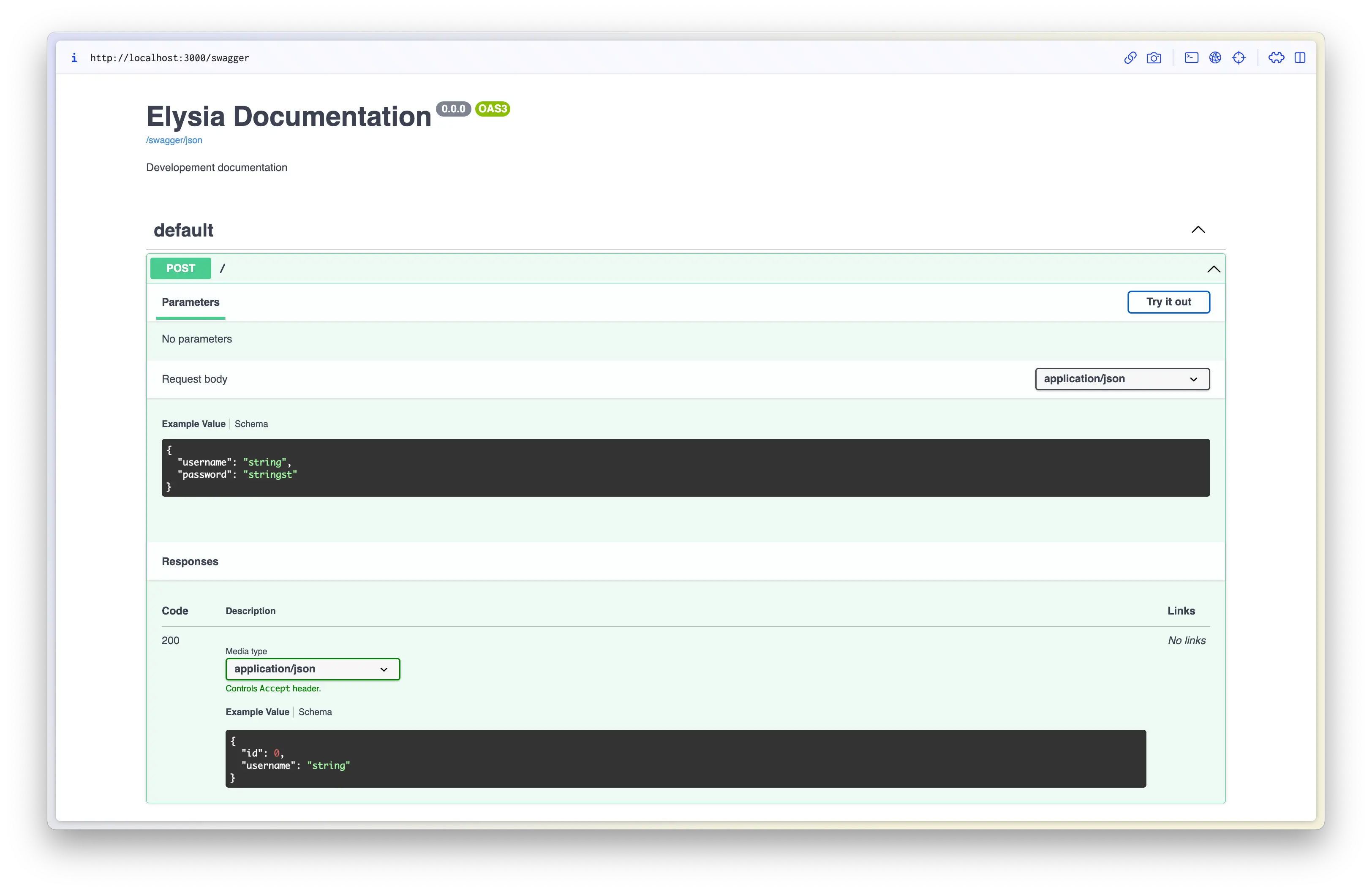
With strict typing, you’re warned if you accidentally return sensitive fields like password.
What’s next
With Prisma, Bun, and Elysia, we’re entering a new era of developer experience.
Elysia accelerates backend web server creation in terms of performance and ergonomics, aiming to match the speed of Go and Rust while delivering a seamless TypeScript journey.
It's an absolute joy to work with.